In real-world operation at buildings, hospitals, and shopping malls, many issues related to automatic doors do not stem from equipment faults but from incorrect mode settings or a lack of understanding of how to use automatic doors in specific situations. Many users rely only on a default mode without fully understanding the purpose of each mode, leading to suboptimal door performance and even impacting safety and operational efficiency. Therefore, understanding automatic door modes not only ensures the system operates logically but also helps optimize traffic flow, save energy, and extend equipment lifespan. So, what exactly are the automatic door operating modes, and how should they be used in different situations? Sonha Auto will explain everything in detail in the following article.
Overview of common automatic door modes today
How do automatic door modes work?
From a technical perspective, each automatic door operating mode is a pre-configured response algorithm. When switching modes, the system automatically adjusts parameters such as sensor sensitivity, opening/closing speed, and driving force to match the intended use and environmental conditions at that time. This is also a fundamental basis for accurately adjusting automatic doors according to real-world operational scenarios.
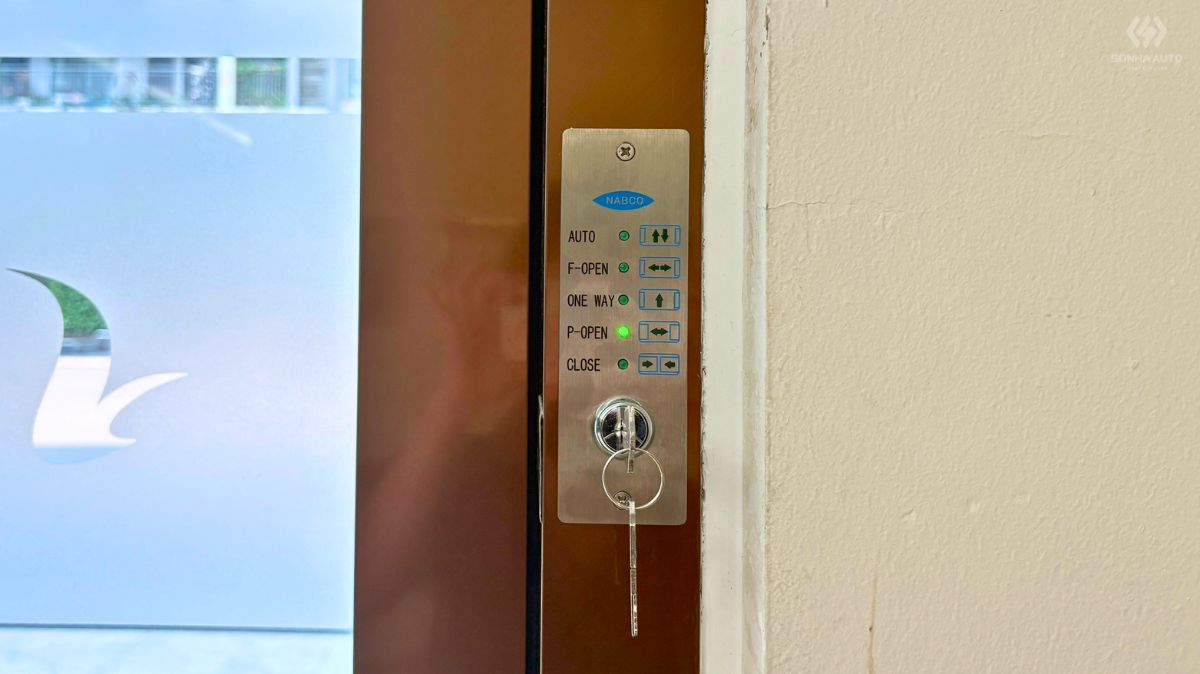
These modes can be adjusted through three methods:
- Automatic door control panel mounted directly on the door
- Remote control device
- Integration with the building management system (BMS)
This flexibility allows operators to easily adjust the door according to different times and usage purposes. It is also a key factor in ensuring security, temperature control, and extended equipment lifespan.
Standard automatic door modes
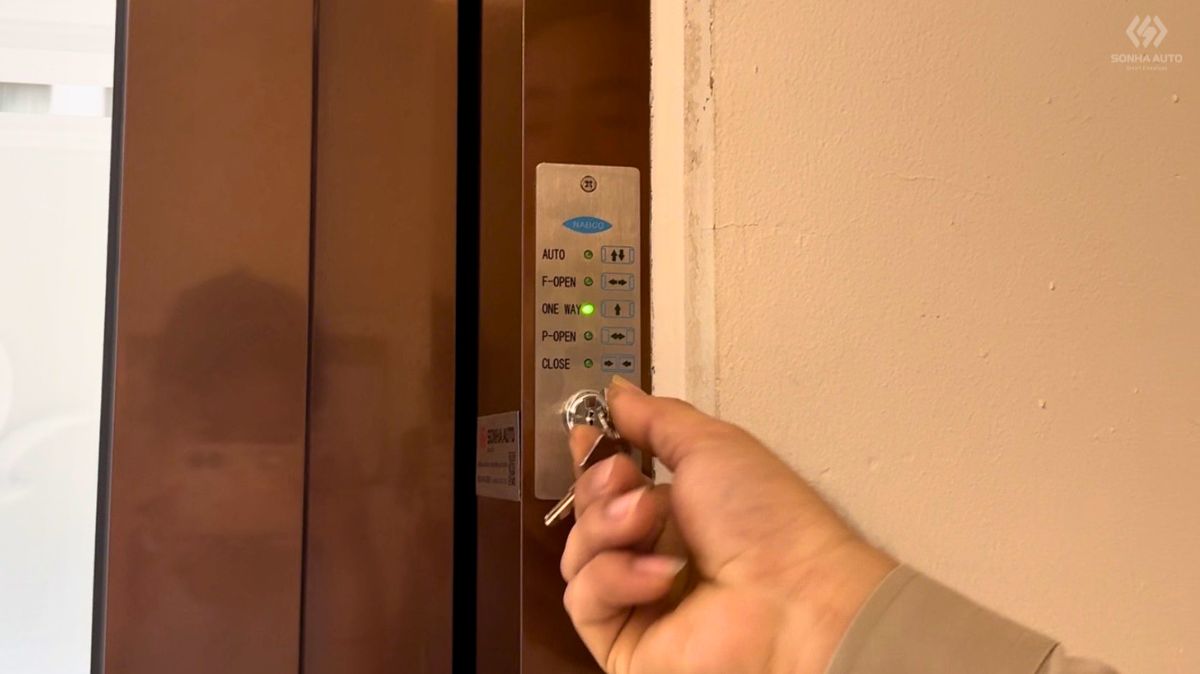
In most modern automatic sliding door systems, especially NABCO automatic doors, the basic modes include:
- Auto
- Full Open
- Partial Open
- Open
- Exit Only/Lock
Each mode differs not only in how the door opens and closes but is also associated with specific real-world operational scenarios.
How to use automatic door modes in practice
To optimize performance and ensure safety, understanding and flexibly switching between modes is essential for technical teams and building managers. It is also a key foundation for using automatic doors effectively.
Auto mode – Standard daily operation
This is the default mode most commonly used in buildings. In Auto mode, the door opens automatically when the sensor detects an approaching person and closes after they pass through. Under normal conditions such as offices, hospitals, or shopping malls, this mode ensures convenience and an optimal user experience.
However, the effectiveness of Auto mode largely depends on the quality and accuracy of the automatic door sensors. If sensors are not properly calibrated, the door may open at the wrong time or fail to detect users, affecting safety. This is also why many people wonder why the door operates inconsistently despite being in Auto mode.
Full Open mode – When maximum traffic flow is required
During peak hours with high traffic volume, switching to Full Open mode is a suitable choice. In this mode, the door opens to its full designed width, creating the widest possible passage. This is especially useful in situations such as peak hours at shopping malls, large events, airport areas, or when transporting bulky goods and equipment.
Using Full Open mode correctly not only reduces congestion but also significantly improves traffic flow, especially in high-density environments.
Partial Open mode – Optimizing energy efficiency
It is not always necessary for doors to open fully. During periods of low traffic, Partial Open mode allows the door to open just enough for people to pass through. This is considered an optimal solution for minimizing energy loss in air-conditioned areas, while also reducing dust and noise from the outside environment entering the building.
In practice, many modern buildings proactively switch from Full Open to Partial Open mode in the evening or during low-traffic hours to optimize operating costs while maintaining necessary convenience.
Open mode – Keeping the door fully open
In certain operational situations, keeping the door fully open is necessary. When switched to Open mode, the door remains fixed and no longer responds to sensor signals. This mode is commonly used during cleaning, maintenance of guide rails, or when buildings host large events requiring continuous movement of people and bulky equipment. However, operators should carefully consider the duration of use, as prolonged use may waste energy and directly affect building security control.
Lock mode (Exit Only/Lock) – Access control
This mode plays a critical role in tightening access control, especially during sensitive time periods. Depending on security requirements, the door can be set to Exit Only to prevent entry from outside after working hours, or fully Locked to disable all sensors and activate electronic locking.
Understanding the difference between these two states helps management avoid unnecessary confusion. A common situation is when users assume the door is malfunctioning because it cannot be opened from the outside, while in fact the system is operating under strict security control.
How to choose the appropriate automatic door mode for each situation
After understanding the characteristics of each mode, the more important question is: when should each mode be used?
Based on time of day, the system can be adjusted as follows:
- Peak hours: prioritize Full Open mode to increase traffic flow
- Normal hours: use Auto mode to balance convenience and efficiency
- Night time: switch to Partial Open or Lock mode to save energy and ensure security
Depending on the type of facility such as hospitals (requiring maximum safety) or shopping malls (requiring flexibility based on traffic) managers will set corresponding switching scenarios to ensure the system operates in the most stable and cost-effective condition.

Common mistakes when using automatic door modes incorrectly
In practice, many issues arise not from the equipment but from improper usage. Leaving the door in Auto mode during peak hours may disrupt traffic flow, while keeping Open mode active for too long leads to significant energy waste.
Additionally, confusion between modes such as Auto and Open, or Lock and Exit Only, is a common cause of improper operation.
Another often-overlooked factor is the lack of periodic system checks. If automatic door sensors are not cleaned or properly calibrated, the effectiveness of the modes will decrease even if the settings are correct.
Instructions for switching automatic door modes
Switching between automatic door modes is relatively simple but must be done correctly to ensure safety. Operators can use the control panel or remote to change modes. In modern systems, this can also be done via a centralized management system. However, the following should be noted:
- Do not switch modes while the door is operating
- Always check the response after switching
- Ensure the selected mode matches actual needs
These seemingly simple actions play an important role in maintaining stable operational performance.
When maintenance or technical support is needed
Even with a clear understanding of automatic door modes, complex technical issues may still arise that require intervention from experienced technicians. Early detection of abnormal signs is crucial to preventing chain failures.
Signs that the system needs inspection include:
- Inability to switch modes
- Slow or incorrect responses
- Unstable operation despite correct settings
In such cases, automatic door maintenance is not just about fixing temporary issues but involves recalibrating the entire system to ensure all technical parameters operate according to the manufacturer’s original specifications.
Instructions on using automatic door modes from Sonha Auto technicians
Sonha Auto – Professional automatic door technical support and maintenance provider
With over 20 years of in-depth experience in the automatic door industry, Sonha Auto is not only an equipment supplier but also a long-term operational partner for customers.
We provide comprehensive technical support solutions including:
- Consulting on the proper use of automatic door modes for each facility
- Inspection and calibration of sensor systems
- Periodic maintenance according to NABCO standards
- Rapid on-site troubleshooting
What sets Sonha Auto apart is not only fixing issues but optimizing the entire system to achieve the best long-term performance. The combination of skilled technicians and Japanese-standard processes ensures not only absolute safety but also maximum cost savings on component replacement, reinforcing professionalism in every detail of the building.
>>> See more: Why does an automatic door does not stop when encountering an obstacle? Safe and thorough solutions
Conclusion
Understanding and correctly using automatic door modes not only improves system efficiency but also ensures user safety and optimizes operating costs. In practice, a properly configured system significantly reduces incidents and enhances overall operational experience. Each mode is designed for a specific purpose, and only when used correctly can the system perform at its best. Therefore, combining a proper understanding of operating principles with regular inspections is essential to maintaining long-term stability.
Contact Sonha Auto for consultation, inspection, and optimization of your door system based on real-world operating modes, ensuring stable, durable, and safe performance in the long term.